

.svg)
PyTorch vs TensorFlow for Production and Edge AI Deployment
PyTorch vs TensorFlow for Production and Edge AI Deployment

This article explains PyTorch vs TensorFlow from the ground up, focusing on what matters for real-world deployment: execution models, compiler stacks(torch.compile and XLA), distributed training, model export formats (ONNX, Saved Model), quantization pipelines, TensorFlow Lite’s deployment toolchain, runtimes, and edge constraints like power, memory, and deterministic latency. It closes with a practical framework selection guide and FAQs.
- PyTorch is the most common choice for research and fast experimentation, and today it can also be optimized for performance using compilation.
- TensorFlow is strong for deployment and production toolchains, especially when you care about mobile/embedded shipping through TensorFlow Lite.
- In real products, the hard part is usually not training. The hard part is getting the model to run reliably with the required speed, power, and memory on the target device.
The rest of this article explains why that’s true.
Start from zero: what is a “framework” here?
When we say PyTorch or TensorFlow, we’re talking about software platforms that help you:
- Define a neural network (layers, weights, operations)
- Train it (compute gradients and update weights)
- Export it (so it can run outside Python)
- Deploy it (run inference on servers, phones, edge devices)
Important concept:
Training(learning weights) and inference (using weights to make predictions) are different phases.
Many systems are trained on powerful GPUs, but deployed on much weaker devices.
The real end-to-end pipeline
Most comparisons stop at “which is easier to code.”
But products must go through a full lifecycle:
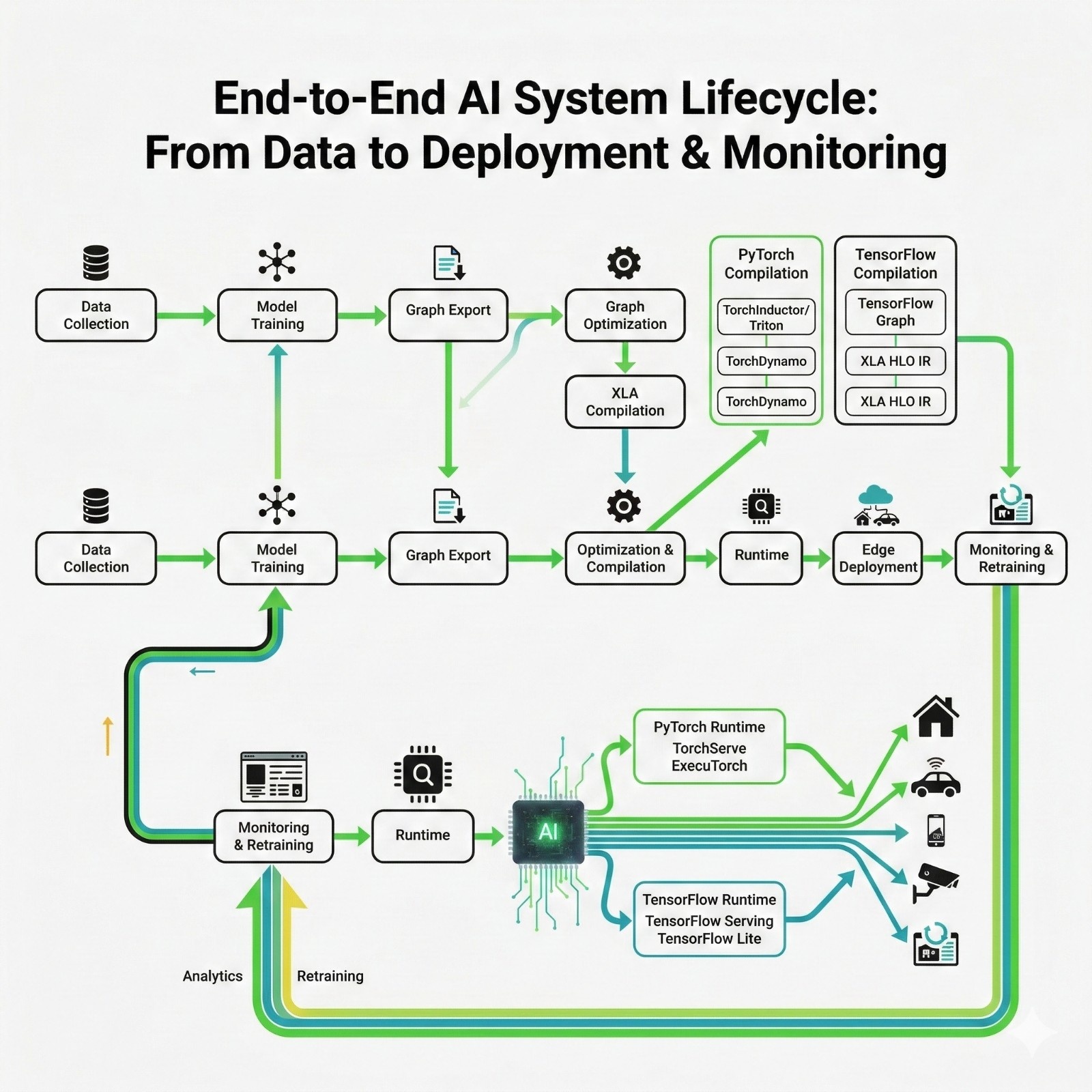
What each stage means
- Data Collection: You gather raw signals (images, audio, sensor readings).
- Model Training: You run training loops to learn weights.
- Graph Export: You convert the model from “Python framework form” into a portable form.
- Optimization& Compilation: You transform the model to run faster on real hardware.
- Quantization: You reduce precision (FP32 → INT8) for speed/power/memory.
- Runtime: The engine that actually executes the model on a device.
- Edge Deployment: You run it on embedded systems / phones / local devices.
- Monitoring& Retraining: You watch accuracy and drift, then improve and redeploy.
Why this pipeline matters:
Because PyTorch vs TensorFlow is not just about training syntax, it affects export formats, runtime choices, and optimization toolchains.
Old comparison vs modern reality
Historically, people compared PyTorch and TensorFlow like this:
Table 1: Old comparison
Translate this into simple terms
Static graph = a blueprint prepared in advance (like compiling a plan before building).
Dynamic execution = building while you go (flexible, but not always efficient).
Modern reality
Both frameworks moved toward the same goal:
“Keep Python-friendly development but run like compiled code in production.”
That is why the real comparison today is: compiler stacks and deployment pipelines.
What is a “compiler stack” in deep learning?
If you’re new, the word “compiler” may sound like C/C++ only.
In ML, a compiler does something similar:
- Takes a high-level model description
- Converts it into an optimized plan for execution
- Fuses operations, reduces memory movement, and generates efficient kernels
Key terms
- Kernel: A low-level optimized function that runs on CPU/GPU(like a highly optimized “matrix multiply”).
- Kernel fusion: Combining multiple operations into one kernel so you don’t keep writing intermediate data back to memory.
- Intermediate Representation (IR): A middle format used by compilers to analyze and rewrite computations.
PyTorch execution and compilation
PyTorch started as “runs like Python.” That’s great for research, but Python has overhead.
Why Python overhead matters
Even if your GPU is fast, if Python is controlling the flow of every operation, you get slowdown.
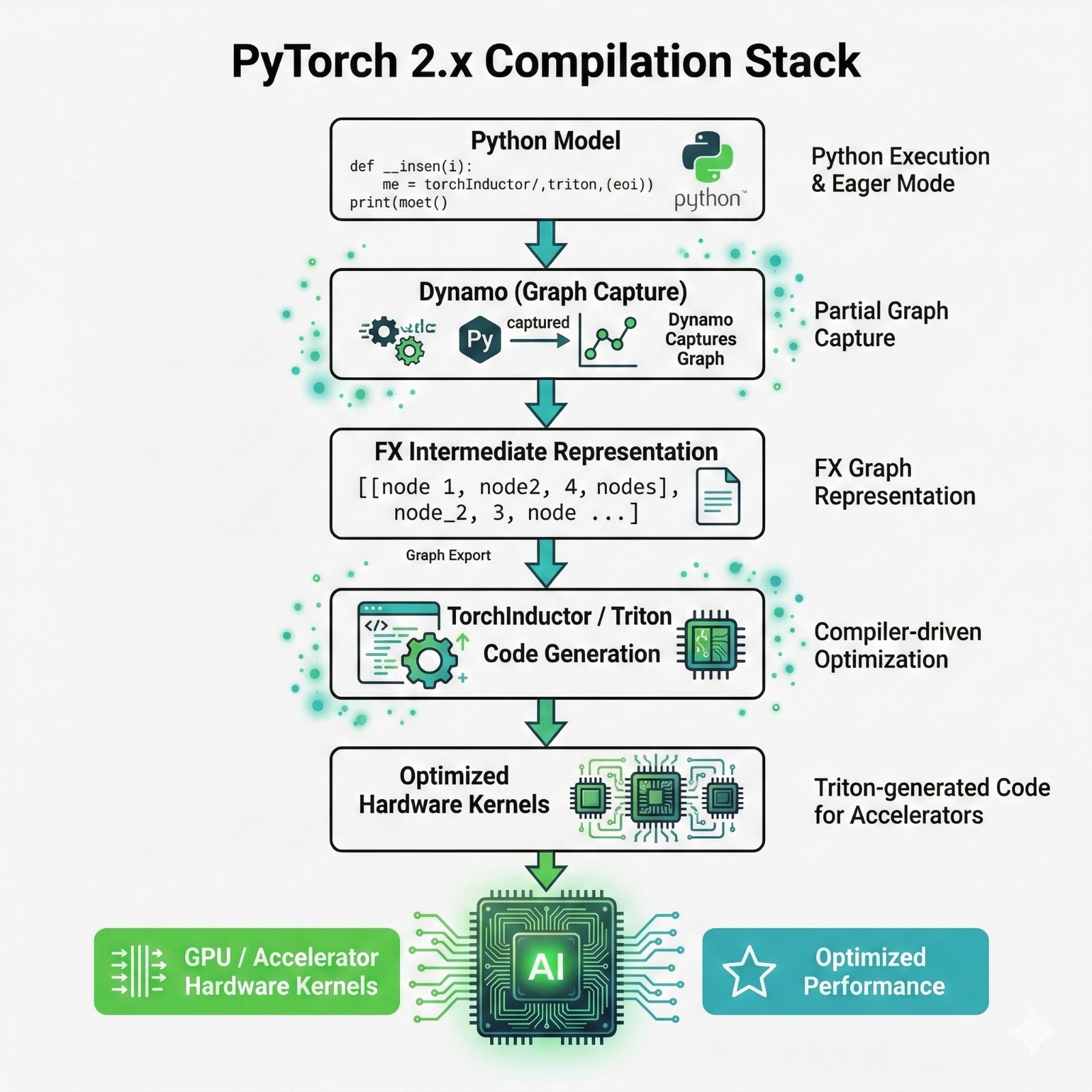
So PyTorch introduced a compilation pipeline that can do:
- Graph capture (turn Python operations into a graph)
- Optimize that graph
- Generate fused kernels
Step-by-step explanation
- Python Model
This is your normal PyTorch model code: nn.Module, forward pass, etc. - Torch Dynamo (Graph Capture)
Torch Dynamo “observes” your model as it runs and extracts the operations into a graph. - FX IR (Intermediate Representation)
The graph is stored in a format that can be edited and optimized. - Torch Inductor / Triton (Code Generation)
This stage generates optimized low-level kernels.
PyTorch today is not “just eager mode.”
It can behave like a compiled framework when needed.
TensorFlow execution and XLA
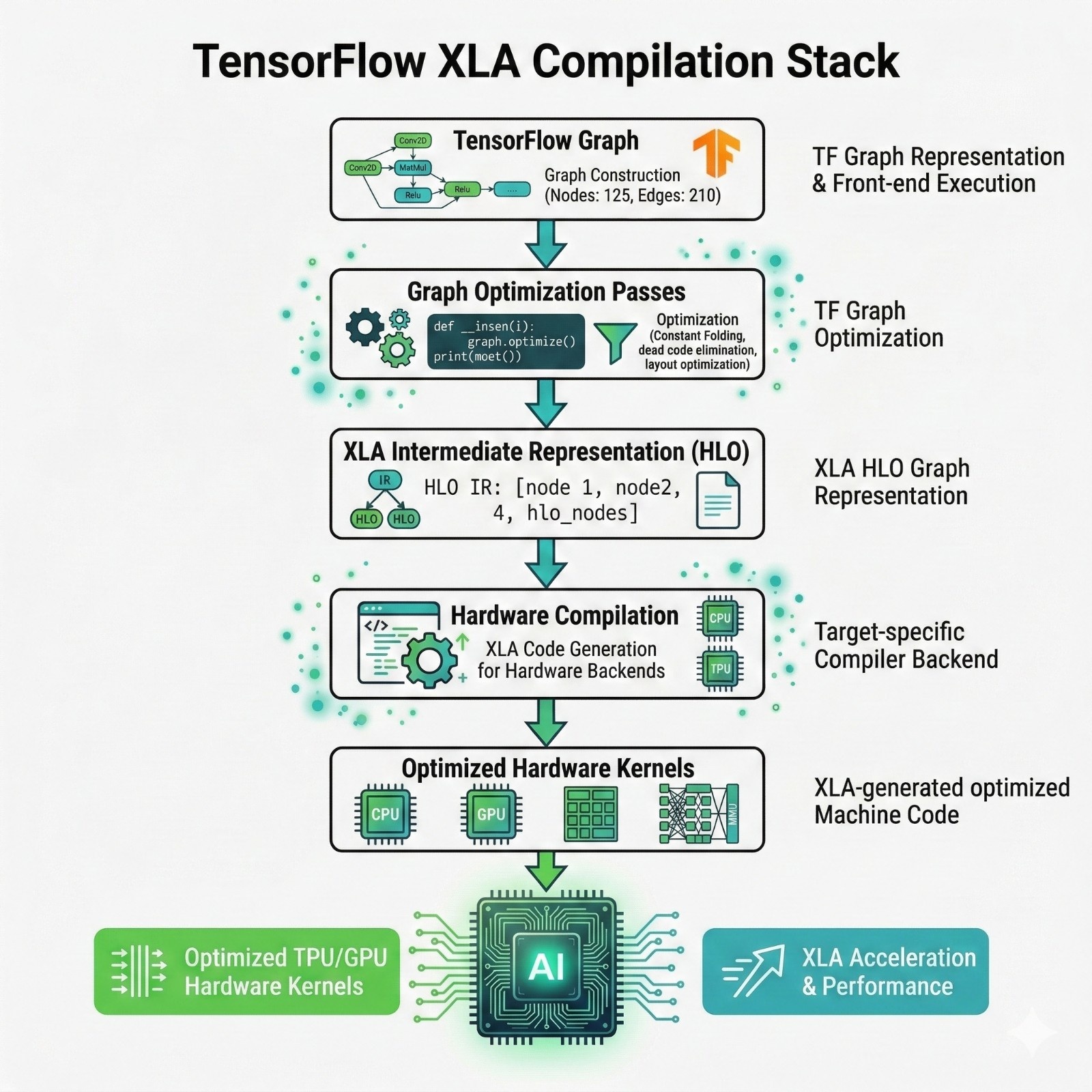
TensorFlow’s big optimization story is XLA.
What is XLA?
XLA= Accelerated Linear Algebra compiler
It is a compiler that takes your TensorFlow computation and rewrites it into a faster execution plan.
What XLA does
Combines multiple ops into fewer ops (fusion)
Reduces intermediate memory allocations
Chooses better layouts for tensors in memory
Generates code tailored to the target hardware
TensorFlow has long been designed with graph + compiler workflows in mind, so its deployment path often feels “built-in.”
Distributed training ecosystems
Why distributed training exists
Modern models can be too large for:
- one GPU memory
- one GPU compute
- reasonable training time
So teams distribute training across many devices.
There are two big problems distributed training must solve:
Compute scaling: split batches across GPUs
Memory scaling: split model parameters across GPUs
Table2: Distributed training
Quick definitions:
- DDP (Distributed Data Parallel): replicate model on each GPU; sync gradients.
- FSDP (Fully Sharded Data Parallel): shard parameters across GPUs so bigger models fit.
- Deep Speed: ecosystem that helps huge models train efficiently.
- TPU strategies: TensorFlow has deep TPU integration.
Model export and interoperability
This is where most “PyTorch vs TensorFlow” articles confuse people.
Key truth: Your training framework is usually not your deployment runtime.
Why?
- Training uses Python and framework internals.
- Deployment may be C++ runtimes, mobile runtimes, embedded runtimes, or specialized accelerators.
So you export models to portable formats.
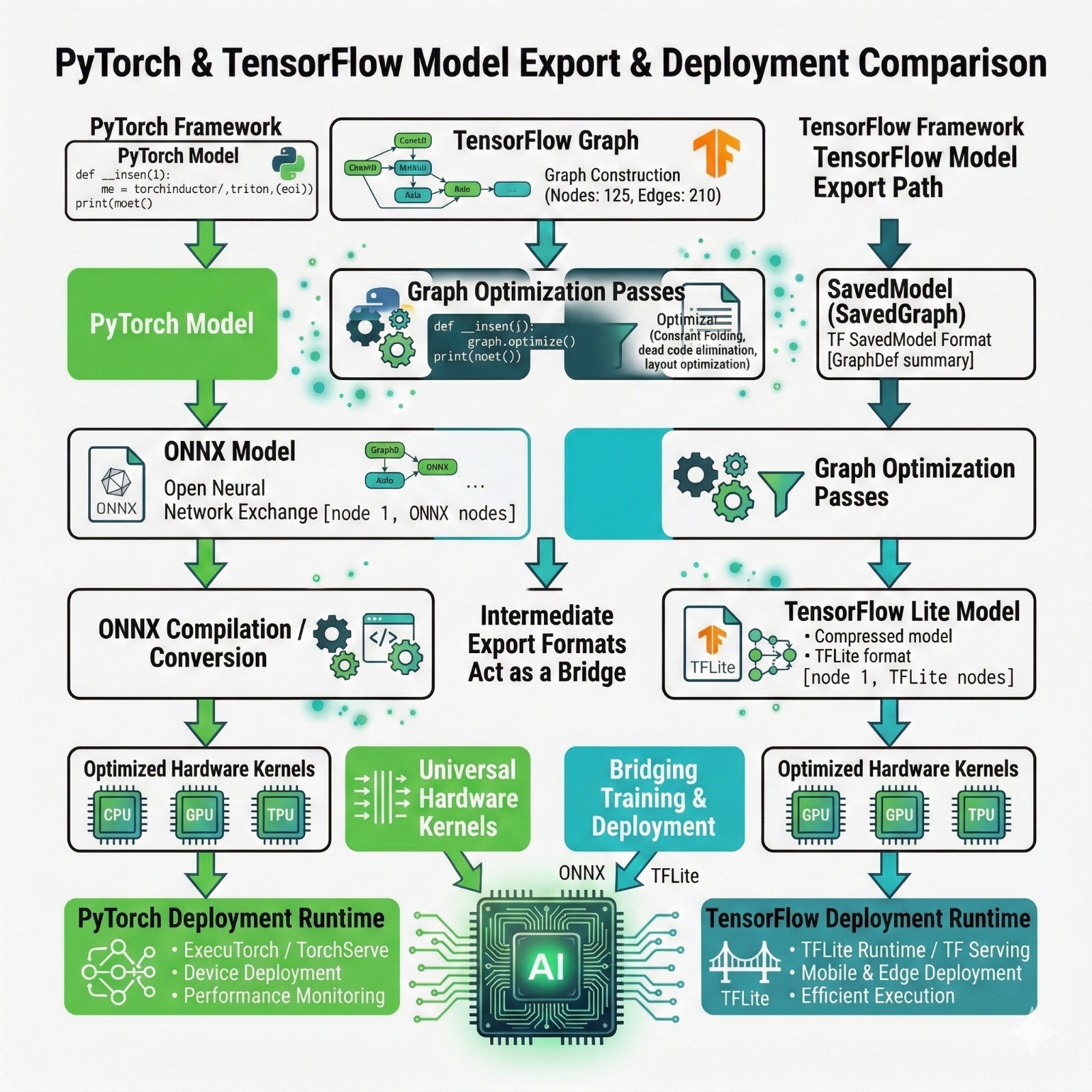
PyTorch export path: ONNX explained properly
What is ONNX?
ONNX is an open standard exchange format for neural networks.
Think of it like a PDF for models:
- PyTorch can export into ONNX
- Many runtimes can read ONNX
Why ONNX matters (practically)
ONNX helps when:
- Your deployment runtime is not PyTorch
- You want to run on diverse hardware
- You want a standard graph representation
Common pipeline
PyTorch → ONNX → ONNX Runtime / hardware runtime
TensorFlow export path: Saved Model → TensorFlow Lite
TensorFlow’s standard deployment flow is:
TensorFlow→ Saved Model → TFLite converter → TensorFlow Lite runtime
What is Saved Model?
TensorFlow’s official serialization format.
What is TensorFlow Lite?
TensorFlow Lite is both:
- · a conversion + optimization toolchain
- an on-device runtime
This is why TensorFlow has a strong “shipping” reputation.
Quantization and TensorFlow Lite connection
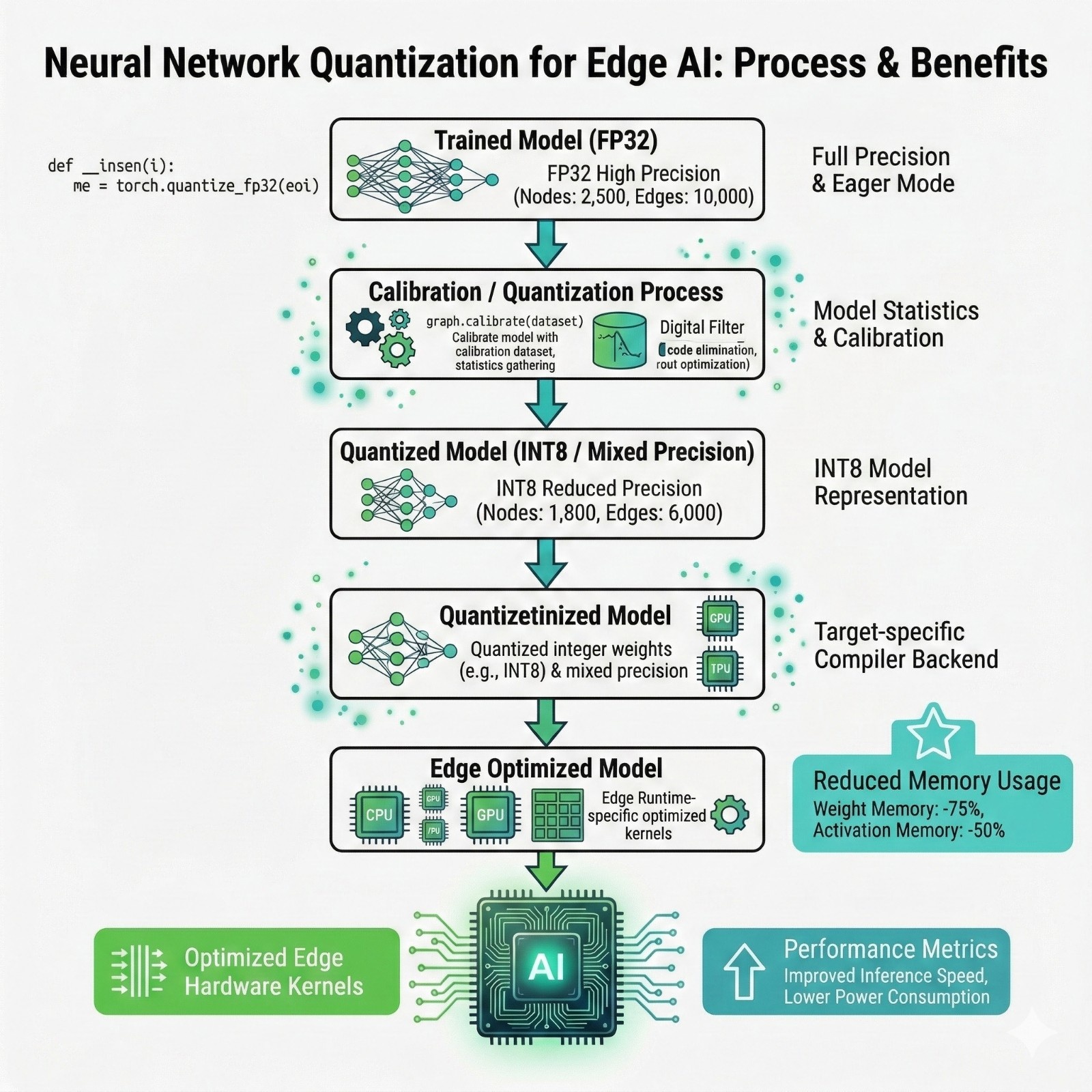
What is quantization, in beginner terms?
Neural networks use numbers (weights and activations).
By default, training uses FP32 (32-bit floating point).
Quantization converts numbers to smaller formats like INT8.
Why smaller numbers help
Smaller numbers:
- take less memory
- move faster through memory buses
- can run on cheaper hardware
- often consume less power
Quantization pipeline
Runtime ecosystems
A runtime is the software that actually runs the model on a target device.
Training frameworks are not always used as runtimes.
Table 3: Runtimes
Why edge deployment changes the decision
Now we connect this back to the primary keyword: edge AI deployment.
Edge deployment means:
- device may be always-on
- must run on limited battery
- may have no network
- must respond quickly
Table 4: Edge constraints
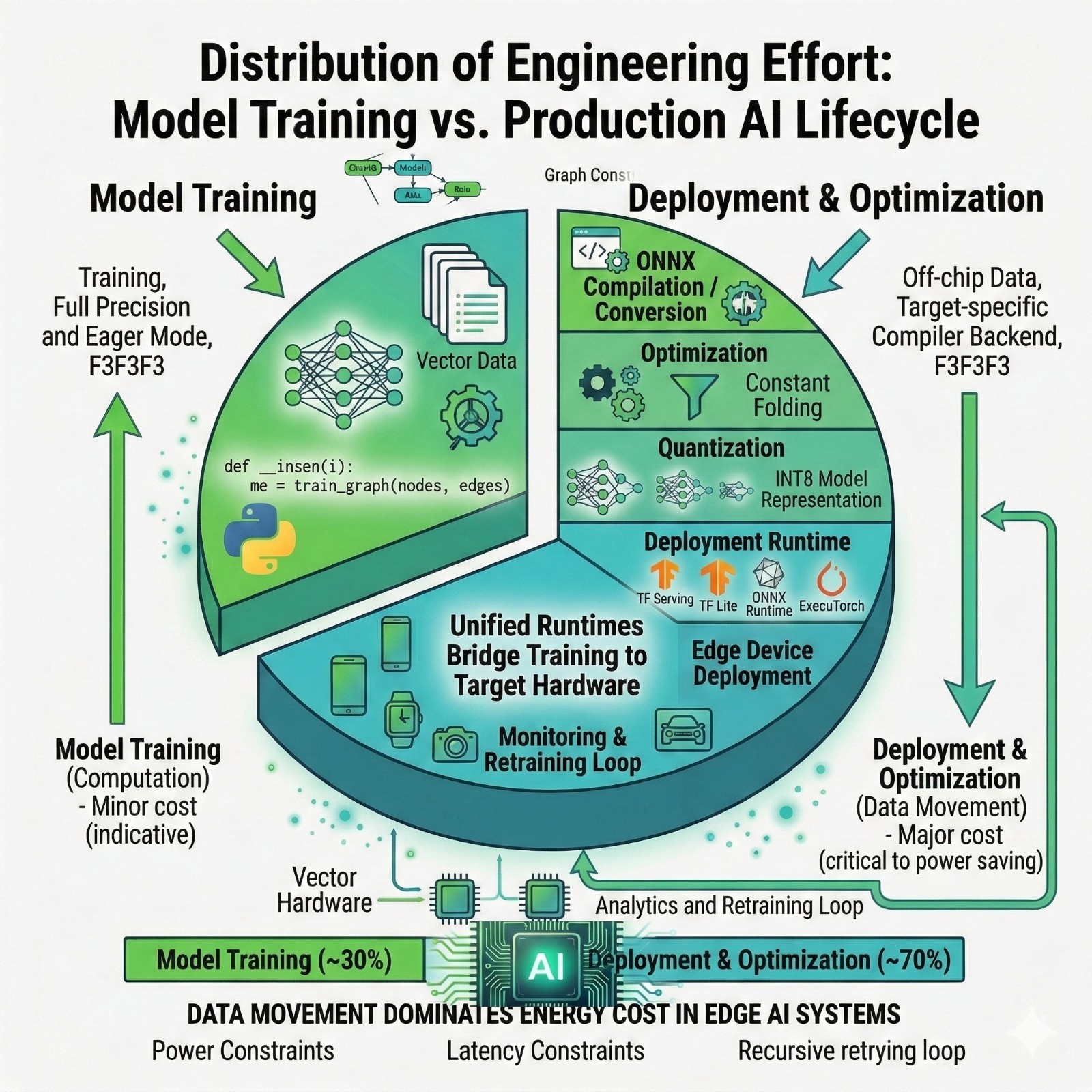
The hidden cost: data movement
This is a core “edge AI” engineering idea:
Moving data can cost more energy than computing.
Practical implication:
- Kernel fusion and compilation matter because they reduce intermediate memory writes.
- Quantization matters because it reduces memory footprint and movement.
A practical decision guide
Table5: Energy cost intuition
Final takeaway
Most people argue about PyTorch vs TensorFlow at the training stage.
But real-world systems succeed or fail after training; at export, optimization, quantization, and runtime integration.
So the best way to think about it is:
Pick the framework that best matches you rdeployment constraints, not just your training preferences.
FAQs
- Is PyTorch only for research?
No. PyTorch is widely used in production. It also hascompilation pathways and server runtimes; and many teams export PyTorch modelsto ONNX for deployment. - Is TensorFlow dead?
No. TensorFlow remains strong in deployment pipelines,especially with TensorFlow Lite for embedded/mobile. - What is ONNX in one sentence?
ONNX is an open model exchange format that helps move modelsbetween training frameworks and deployment runtimes. - Is quantization mandatory for edge AI?
Not always, but it’s extremely common because it reducesmemory usage and power consumption. - Is TensorFlow Lite only about quantization?
No. TensorFlow Lite is a full on-device deployment toolchain;quantization is one of the major optimizations it supports. - Can I train in PyTorch and deploy using TensorFlow Lite?
Sometimes, but usually you’d either:
export PyTorch → ONNX → edge runtime, or
retrace/convert via compatible formats dependingon constraints


.png)

